Pages

Sunday, June 16, 2013

How to get a selected part of a string separate from the back end of the given string in oracle forms

Hi fellas,

Last week i got a task to write a sql statement to select a particular part of a string from given string. The part of the string i need to get separate is in the back end of the original string. Actually given string is path where valuable text document stored in the server. File name is included in this path from the back end. To process the file they need to read the full path from the database and get the file name separated from the original path string.
Actual string is like this,
                       Main_Folder\folder_1\Folder_2\textfile.txt

Every folder is separated by '\' sign and number of folders in string can be different by time to time.Apart from that, the length of the file name can be very. Therefore we cannot predict the length of the original file path and length of the file name as well.My task is to read the original string from back end and cut the string when first '\' sign meets.

To read the string from the back, I had to reverse the given string. We can use REVERSE key word for this. But normally 10g oracle forms doesn't support all the key words in sql. Therefore forms doesn't support for REVERSE as well. Forms doesn't recognize REVERSE as a key word.Therefore we have to use UTL package along with the reverse key word (only for forms).

Lets imagine the original string is like "Main_Folder\folder_1\Folder_2\Sub_folder\TextFile.txt"
First of all I had to reverse the original string and then i can read it until I can find the first '\' sign. Relevant statement is,
  SELECT UTL_RAW.CAST_TO_VARCHAR2(UTL_RAW.REVERSE(UTL_RAW.CAST_TO_RAW
  ('Main_Folder\folder_1\Folder_2\Sub_folder\TextFile.txt'))) FROM DUAL;

Output will be "txt.eliFtxeT\redlof_buS\2_redloF\1_redlof\redloF_niaM"

Then I had to read the string till I can find the position of the first '\' sign. Relevant statement is,
SELECT INSTR(UTL_RAW.CAST_TO_VARCHAR2(UTL_RAW.REVERSE(UTL_RAW.CAST_TO_RAW
  ('Main_Folder\folder_1\Folder_2\Sub_folder\TextFile.txt'))),'\')-1 FROM DUAL;

Output will be "12".


Therefore now I know that i have to substring the given string from 12th position to get only the file name separated. The relevant statement is,
SELECT SUBSTR((SELECT UTL_RAW.CAST_TO_VARCHAR2(UTL_RAW.REVERSE(UTL_RAW.CAST_TO_RAW
  ('Main_Folder\folder_1\Folder_2\Sub_folder\TextFile.txt'))) FROM DUAL,0,(SELECT INSTR(UTL_RAW.CAST_TO_VARCHAR2(UTL_RAW.REVERSE(UTL_RAW.CAST_TO_RAW
  ('Main_Folder\folder_1\Folder_2\Sub_folder\TextFile.txt'))) ,'\')-1 FROM DUAL)) FROM DUAL;

Output will be "txt.eliFtxeT".


Now I had to reverse the separated file name to get the original file name. For this process I had to use REVERSE statement again for the above mentioned output.

For the whole process, relevant statement is like below.

SELECT UTL_RAW.CAST_TO_VARCHAR2(UTL_RAW.REVERSE(UTL_RAW.CAST_TO_RAW((SELECT SUBSTR((SELECT UTL_RAW.CAST_TO_VARCHAR2(UTL_RAW.REVERSE(UTL_RAW.CAST_TO_RAW
  ('Main_Folder\folder_1\Folder_2\Sub_folder\TextFile.txt'))) FROM DUAL,0,(SELECT INSTR(UTL_RAW.CAST_TO_VARCHAR2(UTL_RAW.REVERSE(UTL_RAW.CAST_TO_RAW
  ('Main_Folder\folder_1\Folder_2\Sub_folder\TextFile.txt'))) ,'\')-1 FROM DUAL)) FROM DUAL)))) FROM DUAL;

When we use this in the form, all the SELECT key words and FROM DUAL key words should be left.

Final output of the above mentioned statement will be,
"TextFile.txt".

I used INSTR to calculate the position of the first '\' sing in the reversed string and we must reduce 1 from that position number to get only the file name.

Monday, January 14, 2013

Use SSL in ASP.NET MVC3 Applcation

Hi fellas,

                                 SSL stands for Secure Socket Layer. Normally we use SSL in our web applications. We use it to secure the message transmission on the internet. This will secure the information we transmit via the URL. Different MVC applications use different methods to apply SSL to web application. In this section you will see how to use SSL with your ASP.NET MVC web application.

First of all we have to add related programming codes to the Web.config file of our web application. You can select the form to add this and if you want you can use this for several forms in your application. Bellow is the related XML code you should use in the Web.config file,

<forms loginUrl="~/Account/LogOn" timeout="2880" requireSSL="true"/>

In above XML code requireSSL="true" is the cording part which will take care of SSL. You can add any  related URL to the loginUrl according to your requirement. In above example it's loginUrl="~/Account/LogOn". 

After define Web.config file we have to modify the properties of our application project. to do this right click on the project and select properties.


In project properties select web tab and in that web tab  the Server properties scroll down to the Servers.


In that properties select Use Local IIS Web Server radio button. After that select Use IIS Express checkbox and Overide applicationroot URL checkbox.

Then go the project properties by double clicking on the project and you will get a window like bellow.


In the properties window set SSL Enable as True. After that copy the given URL in SSL URL and paste it on project URl and field under Overide application root URL checkbox like bellow,


Paste the copied URL like bellow,

After modify the web tab in project properties save the changes and the clean the project, Rebuild and run the project. Now your URL will include the https (SSL).

Wednesday, January 9, 2013

FRM-30457: Warning: Maximum Length ignored for character-datatype subordinate mirror itme

Hi fellas,

Sometimes we used Copy Value From Item property and Synchronize With Item property in oracle forms to connect separate items in same form. 

Just imagine we have two items named ITEM1 and ITEm2 and we need to use number of properties like Data Type, Maximum Length, Required property ,  Highest Allowed Value,..etc... of ITEM1 on ITEM2. In these kind of scenario, we can use Copy Value From Item property and Synchronize With Item property to apply them. 
For apply this you have to keep both items in the same data type. 

FRM-30457: Warning: Maximum Length ignored for character-datatype subordinate mirror item will appear if you assign a value for Maximum Length property in child item (in this example it's ITEM2. ITEM1 is the master item.). 
If we assign a value to Copy Value From Item property to some item, we cant assign a value to the Maximum Length property of that item because it refers the master item and will take those properties from that master item. Therefore we have to keep Maximum Length property as 0 for child item.

FRM-30443: Warning: Highest Value Allowed ignored for subordinate mirror item
and
FRM-30444: Warning: Lowest Value Allowed ignored for subordinate mirror item
will be appear if you assign values for Lowest Allowed Value and Highest Allowed Value properties of the child item. You should keep those properties (Lowest Allowed Value / Highest Allowed Value) empty for child item to avoid those above warnings. 

Monday, December 17, 2012

Synonyms in PL/SQL

Hi falks,

In pl/sql synonym refers to schema objects which are created by a particular user to access an objects which  didn't belongs to him.Sometimes we have to join certain modules of a product to retrieve data for business purposes. Normally the particular user has to create the synonym for the related object according to the data requirement. The owner of the object should give grants for this user. 

Owner can create synonyms and give grants to other users who are using different schema s.

User cannot create a synonym for different schema other than his own schema from different schema other than his own schema.

Example statement of creating synonym from different schema for a certain table. Just imagine that your schema is ABC and other schema which include the table you want is DEF and table is employees. Statement is,

      CREATE OR REPLACE PUBLIC SYNONYM synemployees FOR ABC.employees;

User don't have to give any kind of grants to the synonym for his schema. It will assign all the grants automatically when synonym is creates.
But user can give grants to other users (schemas) while creating the synonym.

Thursday, December 6, 2012

Anagram words in text file and file write and replace text through java

Hi all,

Before few days I was having an assignment which need to apply Anagram to the words in a given text file through java. No way of using predefined methods or algorithms for this. Therefore I created simple java program to do this. This might also help you to understand about anagram and some techniques of applying anagram through java.

This is the source code.....

Just imagine that the existing file name is "test"

import java.io.*;
import java.util.StringTokenizer;
 

public class FileRead {

    static String sentence [];
    static String temp [];
    static int i = 0;
    static String first="";

 public static void Read() {

  try{

  // Read the existing text file

  FileInputStream fstream = new FileInputStream("test.txt");
  DataInputStream in = new DataInputStream(fstream);
  BufferedReader br = new BufferedReader(new InputStreamReader(in));
  

  String strLine;
 

  while ((strLine = br.readLine()) != null) {

     StringTokenizer stk = new StringTokenizer(strLine);
     sentence = new String[stk.countTokens()];
    temp = new String[sentence.length];
    while(stk.hasMoreTokens()) {
    sentence[i] = stk.nextToken();
    i++;

  }

  for(int x=0;x<sentence.length;x++){

if(x==0){
temp[x]= sentence[(sentence.length-1)];
}
else{
temp[x]= sentence[x-1];

}

  }
  for(int x=0;x<temp.length;x++){
     first=first+temp[x]+" ";

  }
  // Print original sentence
  System.out.println (strLine);
  System.out.println ("\n");
  System.out.println ("Apply anagram for the above sentence.");
  //Print Anagramed sentence.
  System.out.print (first+"\n");

  first="";

You can write this new phrase by using Filewritter and Bufferwritter as below mentioned. I'm using new text file to write new phrase......


// Write Anagramed sentence to new text file
File file =new File("test1.txt");
    //if file doesnt exists, then create it
    if(!file.exists()){
    file.createNewFile();
    }
    FileWriter fileWritter = new FileWriter(file.getName(),false);
    BufferedWriter bufferWritter = new BufferedWriter(fileWritter);
    bufferWritter.write(first);


The statement "FileWriter fileWritter = new FileWriter(file.getName(),false);" includes "false" in the end of the statement. We can use true instead of using false. The different of these two is , we can write new word or phrase right after the existing word or phrase in the text file by using "true". When we use "false" it will replace the existing word or phrase by given word or phrase.

Wednesday, October 24, 2012

How to put existing tab canvas on a newly created content canvas

Hi fellas,

                               Before few days i got a oracle form which has a tab canvas to display the items of the form. One particular tab include 2 buttons which have to be common to all three tabs. At that time it only belongs to the first tab of the canvas. Part of my task is to make those to buttons common to all three tabs. Given solution is for this is create a new content canvas and place existing tab canvas on that content and place above mentioned two buttons on the content canvas. Content canvas should be larger than the tab canvas. Other wise those button wont get display on the form.
                               If you have to create both the content canvas and tab canvas you can simply create a content canvas and can draw a tab canvas on that content canvas. No need to have set any property or anything else for that. But when you have a existing tab canvas, you just cannot create new content canvas and place or set the tab canvas on that. In a situation like this we can use different method to do this.
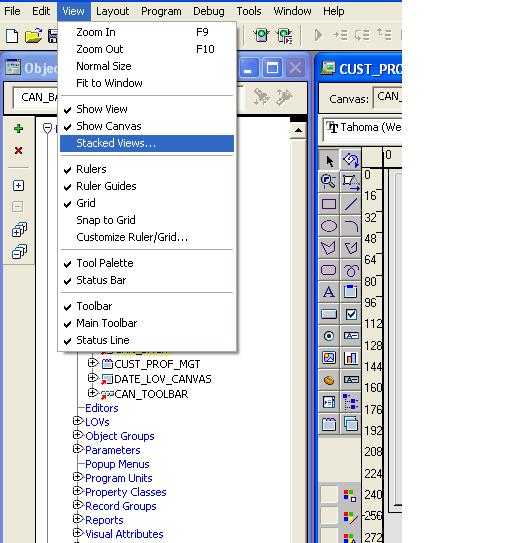
                               First create a content canvas and make it larger than the existing tab canvas. Then double click on the new content canvas and click on the VIEW tab of the form builder and select STACKED VIEWS.. After that you will get a window which is showing the existing canvases.


                         In that window you can select the canvas you need to set on the newly created canvas. Now Our tab canvas is displaying on the content canvas and simply we can place the above mentioned two buttons on the content canvas. Now those two buttons are common to all three tabs. We don't have to set any kind of property for this.

Tuesday, October 2, 2012

How to extract only number values from given string....

Hi fellas,

                         In oracle development, sometime we have to extract only the numbers from the given string. If the given string is has a dynamic length we can use TRIM for this task. But we have select whether it is LTRIM or RTRIM. Just imagine we have a string like '-4646'. We have to extract the numbers without '-'. We can use below statement for that.
                               select LTRIM('-4646','-') from dual;
If the unwanted part of the string ('-' in the example) is in left side, we can use LTRIM. If it's on the right side, we can use RTRIM.
Just imagine we have a string like '---00045454' and we have to extract only '45454' from the string. Also the length of this string can be change. Its dynamic. Apart from that the number of numbers in the string can be change and the number of '-' s and '0' can be change. In this kind of a situation we can use TRIM like below.
                              select LTRIM ( LTRIM (  '---00045454' , '-' ) , '0' ) from dual;

You can use both LTRIM and RTRIM like below for some situations.
                             select RTRIM ( LTRIM ( '----4587000' , '-' ) , '0' ) from dual;

You can use number of times of trims in your statement accordingly. The major thing you should consider is that you should give the characters you want to delete in a proper order. Otherwise it wont give the real output you want. The other thing you should consider about is select the trim you should use according to the places of the characters (RTRIM or LTRIM).   

You can use trim within trim in your statements. In those kind of situations,the most inner trim will trim the value accordingly and pass the resulted value to the previous trim. This trim will trim the value accordingly and pass the value to his previous trim and so on and on. You can use this function with REG_EXP_REPLACE simultaneously.
TRIM function is really suitable for the situations like 

  • String has a dynamic length.
  • Number of  unwanted characters can be change by time to time.
  • Both starting point and ending point includes unwanted characters.
Trim couldn't filter all the characters. But he will do somethings for you when he fit to the situation.

Monday, September 10, 2012

How to put a hyperlink in Oracle forms.....

Hi fellas,
                  Hyperlink is something like a URL. we can click on that and it will navigate us to the relevant location where we can have information we need. First of all we need to have relevant window and canvas to display the relevant information for the users. Our hyperlink will navigate the user to this newly created canvas to show the information. You can add any item like text items, display items, tables and etc...
                  To add new hyper link, first you have to add new Text item on the canvas that you need to display the hyperlink to the user. It's better change it's Visual Attribute Group as "VA_CLICK". You don't have to write anything in the "Prompt" section to display. Because hyperlinks didn't display anything in Prompt section.  Apart from that you should set BEVEL = NONE in the property palate of the text item. You should call to the newly created canvas in  WHEN-MOUSE-CLICK trigger by using SHOW_VIEW. Apart from that we can use web.Show_Document to show the relevant page to the user. But we can use web.Show_Document from within a form which run from the web.
                 If you run the form with above modification, still you wont be able to see the hyperlink. But it's there where you placed it and you can see it's functionality by clicking on the area you placed it. To display the hyperlink, you should assign a relevant name for the item within the trigger or program unit where you populate the data to the canvas where you placed your hyperlink. Otherwise it wont get display. eg - :BLK_MAIN.HYPERLINK := Hyper Link(Hyperlink name). Then only you can view this through your form.

Thursday, July 26, 2012

How to compare two columns in a same table in a select statement and show a particular result ...

Hi Oracle fellas,

                        Some times in oracle developments, we have to compare various kinds of values, table columns and etc.. to give a comfortable out put for the users. In this process, some times we have to give them feedback by showing them some kind of status or a value putting to newly created column which is not in the related database table.
                        As an example, just imagine we have table name "Employees" and it include Emp_No, Emp_name, Previous_Year_Salary and Current_Year_Salary columns. We have to compare the previous salary with current salary and return a value as M if those two values are equal and NM if not equal. Apart from that we have to display above value in a separate column name "any name" which not include in Employees table. Just image that we are advised to not to add any new column to the related table.
All you have to do is write a simple SELECT statement and put two columns into decode function with two values you have to return accordingly. It's like,
SELECT  Emp_No, Emp_name, DECODE(Previous_Year_Salary , Current_Year_Salary, 'M', 'NM') 
FROM Employees;
Above statement will return all the fetched records with the relevant comparison and relevant newly added column values. You can put a name to new column like bellow.

SELECT  Emp_No, Emp_name, DECODE(Previous_Year_Salary , Current_Year_Salary, 'M', 'NM')  as 'any name'
FROM Employees;

Apart from this DECODE function includes lots of formulas we can use. Within DECODE function we can not only compare numbers, but also dates and characters as well.

Thursday, June 21, 2012

ORA- 12154: TNS:could not resolve service name in Oracle Formbuilder or Report builder


Hi Oracle fellas,

                            You will get above problem when you are using oracle form builder or report builder. This can happen because of various kinds of reasons. It can happen because of the error of the TNS name you are trying to connect. May be the port numbers can be wrong or something like that. You cannot connect through form builder means that form builder cannot see or find your TNSNAMES.ora file. Form builder uses the TNSNAMES.ora file and SQLNET.ora file found under the iDS suite folder - under this folder the NETWORK - ADMIN folder. Sometimes there can be syntax errors like unrelated parentheses in your TNS name. Including these kind of error makes TNS file unusable.

To overcome this problem always maintain your TNSNAMES.ora file without any errors. Keep your .ora files in proper directory.

If you are using directory naming, 
Verify that "LDAP" is listed as one of the values of the NAMES.DIRECTORY_PATH parameter in the oracle net profile(SQLNET.ora).
Verify that the LDAP directory server is up and that it is accessible.
Verify that the net service name or database name used  as the connect identifier is configured in the directory.
Verify that the default context being used is correct by specifying a fully qualified net service name or a full LDAP Dn as the connect identifier.

If you are using easy connect naming,
Verify that "EZconnect" is listed as one of the values of the NAMES.DIRECTORY_PATH parameter in the oracle net profile(SQLNET.ora).
Make sure the host,port and service name specified are correct.
Try enclosing the connect identifier in quote marks.

Sometimes this happen when your are using particular oracle version in the first time. Reason for this kind of scenario is the problem with SQLNET.ora file. You can see few lines of statements in that .ora file. In the very first moment only first two lines were commented. Therefore you wont be able to connect to needed database via form builder or report builder. Only you have to do is comment all the lines in that file and try to connect to the database you want.

There may be different oracle products installed in your computer. Each of these products contains it's own NETWORK/ADMIN directory which is the location of .ora files. Therefore we can maintain only one TNSNAMES file for all the products in your computer. TNS_ADMIN environmental variable will allow you to do that. Take any of the TNSNAMES.ora file and put it in to a directory (like "D:\0_library") which is easily accessible and let the TNS_ADMIN environment variable point to its directory. Then do as follows,

c:\ temp>set tns_admin 
tns_admin = D:\0_library
c:\ temp

Simply log in to your database.....:)